Disclaimer: While this article was written before I started working at SoftArtisans, I do work at SoftArtisans now. Support for SoftArtisans products can be found at http://support.softartisans.com/
So today I tried out a product from SoftArtisans called OfficeWriter specifically the WordWriter feature. You can find a Demo here. I set out to create an application that would allow me to fill in a form and generate mailing labels to be printed. I found out that with SoftArtisans product this was extremely easy.
First I created a Mail Merge template in Microsoft office. You can download a copy of my Label Template if you would like.
Then I wrote the following code:
  protected void generateBtn_Click(object sender, EventArgs e)
        {
            // Variables
            object[] arrValues = { firstNameTxt.Text, lastNameTxt.Text, addressTxt.Text, cityTxt.Text, stateTxt.Text, zipCodeTxt.Text };
            generateLabels(arrValues);

        }

        private void generateLabels(object[] arrValues)
        {
            WordTemplate wt = new WordTemplate();
            wt.Open("C:/labels.doc");
            string[] arrNameFields = { "First_Name", "Last_Name", "Address_Line_1", "City", "State", "ZIP_Code" };

            //Bind Mail Merge Fields with Data
            wt.SetDataSource(arrValues, arrNameFields);

            wt.Process();
            //Save to browser
            wt.Save(Page.Response, "Labels.doc", false);
        }
with the following front end:
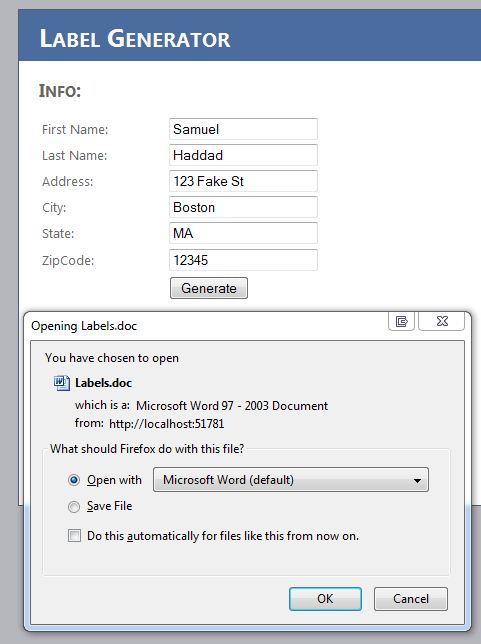
When opening the generate document I had the following output:
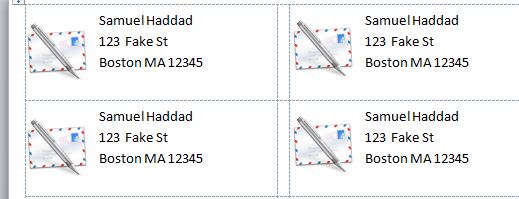
You can download my solution here, but remember that you need an Office Writer license or you must be using the demo license.
 Do you like my work? How about buying me a coffee?