Disclaimer: While this article was written before I started working at SoftArtisans, I do work at SoftArtisans now. Support for SoftArtisans products can be found at http://support.softartisans.com/
So today I tried out a product from SoftArtisans called OfficeWriter specifically the WordWriter feature. You can find a Demo here. I set out to create an application that would allow me to fill in a form and generate mailing labels to be printed. I found out that with SoftArtisans product this was extremely easy.
First I created a Mail Merge template in Microsoft office. You can download a copy of my Label Template if you would like.
Then I wrote the following code:
  protected void generateBtn_Click(object sender, EventArgs e)
        {
            // Variables
            object[] arrValues = { firstNameTxt.Text, lastNameTxt.Text, addressTxt.Text, cityTxt.Text, stateTxt.Text, zipCodeTxt.Text };
            generateLabels(arrValues);

        }

        private void generateLabels(object[] arrValues)
        {
            WordTemplate wt = new WordTemplate();
            wt.Open("C:/labels.doc");
            string[] arrNameFields = { "First_Name", "Last_Name", "Address_Line_1", "City", "State", "ZIP_Code" };

            //Bind Mail Merge Fields with Data
            wt.SetDataSource(arrValues, arrNameFields);

            wt.Process();
            //Save to browser
            wt.Save(Page.Response, "Labels.doc", false);
        }
with the following front end:
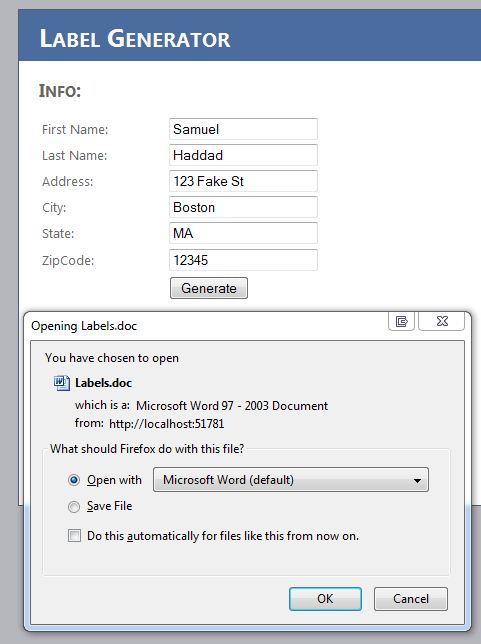
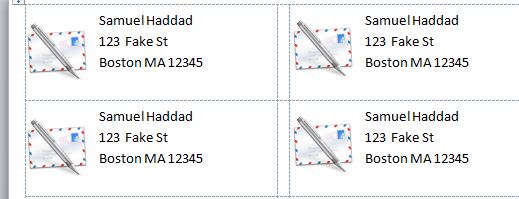
When opening the generate document I had the following output:
You can download my solution here, but remember that you need an Office Writer license or you must be using the demo license.