Music is everywhere with today’s high speed internet is most home it is no wonder that music is even moving to the World Wide Web. Many radio stations allow you to stream their stations over the internet. Many websites have been developed around music, like www.jango.com, www.pandora.com, and www.last.fm. I recently released my second version of Jango Desktop and one of the features I implemented was the ability to look up lyrics. Before I started I was thinking about all the ways I could parse the lyrics out of an existing lyric’s websites database. During my searching I stumbled upon http://lyricwiki.org/. Here is a small description of LyricWiki from the website:
LyricWiki is a free site which is a source where anyone can go to get reliable lyrics for any song, from any artist, without being hammered by invasive ads.
At this point you are probably thinking to yourself the same thing I did “Great, but where do I start?” So today I am writing a step by step tutorial on how to use Lyric wiki in your .NET program.
Creating a simple lyric demo program:
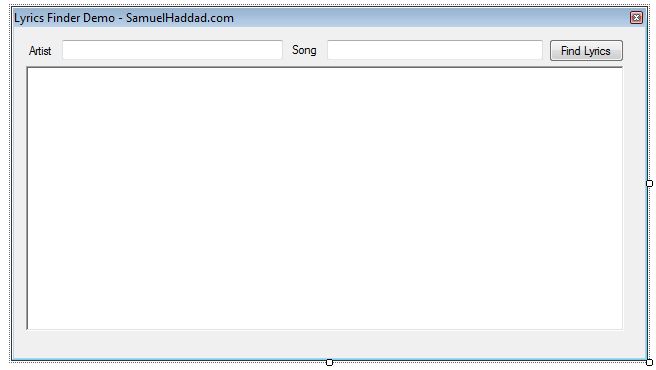
Step 1: Create the Form
Open visual studio and setup your form to look similar to mine.
Adding the web service:
Because LyricWiki offers a web service, you will want to add it to your program as a web reference. Right click on your solution and select add a web reference, or in .net 3.5 add a service reference -> then go to advance and add a web reference. The service’s URL is http://lyricwiki.org/server.php?wsdl you will want to add it like below if you press go you should see the available methods.
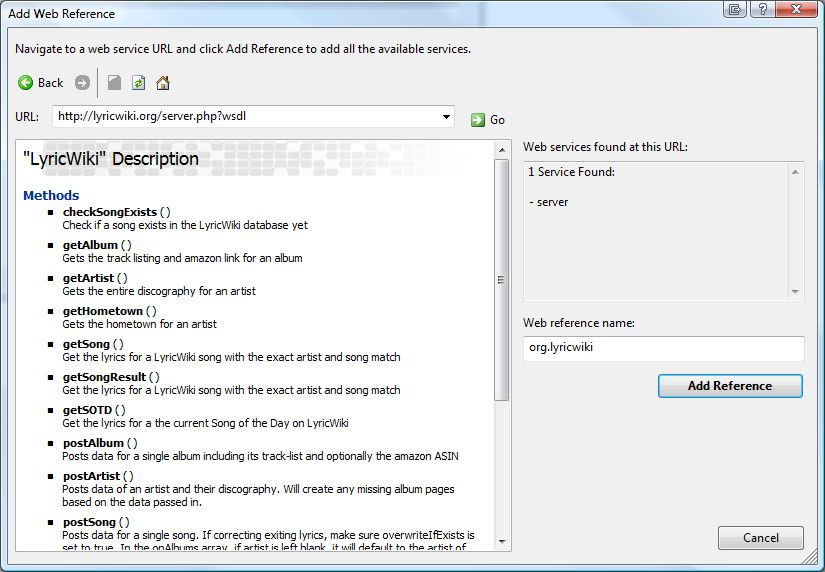
Adding a Web Reference
Writing the code:
Double click on your button on the form and let’s right some code to handle the lookup.
Add this to the top of your code:
using LyricsLookup.org.lyricwiki;
Then add this to the button clicked method:
private void LyricsButton_Click(object sender, EventArgs e)

{

LyricWiki wiki = new LyricWiki();

LyricsResult result;

string artist = artistTextBox.Text;

string song =   SongTextBox.Text;

if(wiki.checkSongExists(artist,song))

{

result = wiki.getSong(artist, song);

Encoding iso8859 = Encoding.GetEncoding("ISO-8859-1");

LyricsRichTextBox.Text = Encoding.UTF8.GetString(iso8859.GetBytes(result.lyrics));

}else{

StatusLabel.Text = "Lyrics not found in database";

}

}
Then run and test.
Download the full solution of LyricsLookup