Software
Uninstall TrendMicro OfficeScan
This procedure work as of June 5th 2010
The problem:
When trying to uninstall TrendMico Office Scan you are prompted for a password.
Solution:
- Start -> run and type MSCONFIG
- Under services and uncheck TrendMicro Unauthorized Change Prevention Service
- Restart the computer
- Start -> run type Regedit
- Navigate to HKEY_LOCAL_MACHINE\SOFTWARE\TrendMicro\PC-cillinNTCorp\CurrentVersion\Misc
- Changing the AllowUninstall value to 1
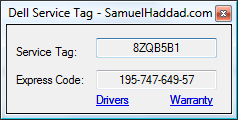
Find Dell Service Tag with C#.NET
In my line of work, I deal with a lot of Dell computers. I decided to write a little program that I could carry on my flash drive with me and all my other technical applications. What I like most about this application is the ability to quickly get to the Dell Warranty and driver information. I hope that someone else find this useful as well, if you do let me know.

Download Dell Service Tag Finder: Source | Executable
This is was possible using Windows Management Instrumentation and if you are interested in pulling other information from your computer I recommend you read up on it. For this example I used the Win32_BIOS Class, but you can find all the WMI Classes here.
Preview of Source:
String dellServiceTag;
private void Form1_Load(object sender, EventArgs e)
{
//Load Service Tag
ManagementClass wmi = new ManagementClass("Win32_Bios");
foreach (ManagementObject bios in wmi.GetInstances())
{
dellServiceTag = bios.Properties["Serialnumber"].Value.ToString().Trim();
}
Display.Text = dellServiceTag;
}
Notes:
This application requires the .NET Framework or you may receive application errors.
The service tag is pulled from the BIOS so if you ever had your motherboard replaced and the service tag was not reset it will be blank.
Creating a Single Instance C# Application
This is something I find myself looking up alot so I decided to put it into a post for easy access, and for anyone else who might be looking for a solution.
using System.Threading;
static class Program
{
/// <summary>
/// The main entry point for the application.
/// </summary>
[STAThread]
static void Main()
{
bool createdNew = true;
using (Mutex mutex = new Mutex(true, "SignleInstance", out createdNew))
{
if (createdNew)
{
Application.EnableVisualStyles();
Application.SetCompatibleTextRenderingDefault(false);
Application.Run(new Form1());
}
}
}
}
Download Single Instance Application Source Code
I still don’t get why in Visual Studio in VB.NET one could click make single instance application, but that same feature doesn’t exist in C#? Don’t all .NET languages just get compiled to the CIL in the end?
Visual Studio Tips and Tricks
Alternate Case/Format selection:
Have you ever been asked to update some code from a long time ago only to find that almost every tag is in capital letters? AGHH!
<HTML> <HEAD> <TITLE>My Really Old Site</TITLE> </HEAD> <BODY> <P> Lots of body test </P> <P> Lots of body test </P> <P> Lots of body test </P> <IMG SRC="mypic.jpg" width=351 height=113> </BODY> </HTML>
Highlight all that code and press CTRL + K then CTRL + F and you will format all the code. It would then look something like this
<html> <head> <title>My Really Old Site</title> </head> <body> <p> Lots of body test </p> <p> Lots of body test </p> <p> Lots of body test </p> <img src="mypic.jpg" width="351" height="113"> </body> </html>
Granted your code may still be far from perfect, but it is definitely a huge help.
Key Launcher (Like Alt + Tab on Windows)
Are you someone that lives by keyboard shortcuts? I know I am. Are you familar with Windows Alt + Tab keyboard shortcut and toggling through all active programs? Well a similar feature exists within Visual Studio press Ctrl + Tab and toggle through your active Windows and Files.

Intellisense
Control + Spacebar will bring up intellisense if you are in code view. Great if you click out by accident or you just want to see what is available in the scope of the code.

Break Points
Have a bunch of break points scattered over a couple of files in a solution. Just want to delete them all and start fresh. Ctrl + Shift + F9 will delete all current break points in a solution. Don’t worry Visual Studio will prompt you with a confirmation first.
Get Visual Studio Professional for free!
Well maybe. If you are a student like myself you can head over to https://www.dreamspark.com/which is run by Microsoft. They offer full versions of some of the newest Microsoft products, like Visual Studio. Why? Because they know we are the future and they think we are an investment. Take them up on the opportunity and get ahead of the competition.
Shortcut key posters:
Microsoft Visual Studio has a bunch of keyboard combinations that can be very helpful, to get a more complete list check out some of the resources Microsoft offers:
Visual C# 2008 Keybinding Reference Poster
Visual Basic 2008 Keybinding Reference Poster
Visual C++ 2008 Keybinding Reference Poster
Visual C# 2005 Keyboard Shortcut Reference Poster