Overwriting an Excel file destination using SSIS

This was a problem I racked my brains over for a while when I first started using SSIS. I found a few possible including using a File System task to copy a “Template” Excel file over the existing on, or generating unique files by appending the date.  I simply wanted to overwrite the existing data just like the Flat File Destination gives you that option.

My work around was as flows:

Create the Data flow the way you normally would, then go to the Control View Then add two Execute SQL Tasks before your data flow is called so it looks like this
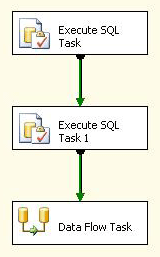
Step 1: Add Execute SQL Task 1 to Control Flow

Step 1: Add Execute SQL Task 1 to Control Flow

Set both Execute SQL Tasks to use the Excel file
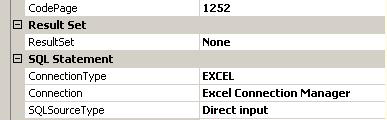
Step 2: Set Connection Manager

Step 2: Set Connection Manager

Set your first Execute SQL Task’s SQL Command drop your table which is also known as the sheet name of your Excel file.
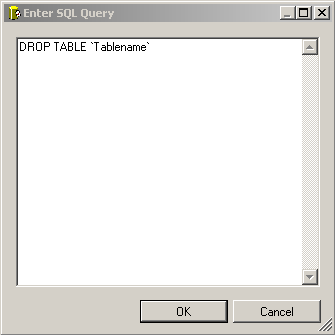
Step 3: Drop Table

Step 3: Drop Table

Repeat step 3 on the second Execute SQL Command this time create your tables.

That’s it. Good luck.

Share and Enjoy:
  • Digg
  • del.icio.us
  • Facebook
  • Google Bookmarks
  • Reddit
  • Slashdot
  • MySpace
  • StumbleUpon
  • Tumblr
  • Twitter
  • email
  • Print

Tags: , , , ,

Tuesday, March 31st, 2009 Desktop Enginnering, Programming, SSIS, Software, Web Design

17 Comments to Overwriting an Excel file destination using SSIS

  • Sweta says:

    Just thot of trying ur suggestion…..but facing a problem as below….

    What would be the best way to provide the table name in this qry ??

    ERROR
    [Execute SQL Task] Error: Executing the query “DROP TABLE Incident.xls” failed with the following error: “Syntax error in DROP TABLE or DROP INDEX.”. Possible failure reasons: Problems with the query, “ResultSet” property not set correctly, parameters not set correctly, or connection not established correctly.

  • Samuel Haddad says:

    The correct Syntax would be something like
    DROP TABLE `Excel_Destination` SSIS uses those weird ` characters, it might be best to double click on your Excel destination try creating a new sheet then copy and paste the syntax just renaming create to drop.

  • Craig-o says:

    This was a big help in an SSIS project I just completed. If you don’t mind, Here’s a little syntax for the CREATE table statement that creates a range called “employee” in excel with the following columns:
    CREATE TABLE `employee` (
    `emp_id` NVARCHAR(10),
    `Last Name` NVARCHAR(30),
    `First Name` NVARCHAR(20),
    `Logon ID` NVARCHAR(50),
    `Email Address` NVARCHAR(100),
    `Office Location` NVARCHAR(3)
    )

  • Matt says:

    Nice Article! I have everything working except that the data is appending to my spreadsheet instead of overwriting it each time? What am I missing?

  • Samuel Haddad says:

    Matt, Glad you liked the article. You have to go into the control view of SSIS, and setup the SQL tasks to drop the table and recreate it. The excel destination does not have an overwrite feature by default. If you are getting stuck at a certain part let me know.

  • Justin says:

    Hey Samuel, I got problem. I think you got answers to this question. I have excel sheet which is used for reporting. I have to update the excel column from sql server 2005. The problem here is that i can’t drop the table(in excel) as u suggest because i have used function linked with each column on the excel sheet to creat pi chart and other reporting charts. So How can i update each column without affacting those functions in excel sheet.

  • khurram Nazir says:

    It doesn’t work.
    You can’t perform [drop table sheet1] or [drop table UnusedIndexes] statment on excle sheet.
    I’ve tried 13 times it doesn’t work.
    I AM JUST DELETING A SPREADSHEET IN A UNUSEDINDEXES FILE.

    I moved step by step… It doesn’t work.

    //————-See below error———

    SSIS package “Package.dtsx” starting.
    Warning: 0×0 at Execute SQL on Sheet: Multiple-step OLE DB operation generated errors. Check each OLE DB status value, if available. No work was done.
    Warning: 0×0 at Execute SQL on Sheet: Multiple-step OLE DB operation generated errors. Check each OLE DB status value, if available. No work was done.
    Error: 0xC002F210 at Execute SQL on Sheet, Execute SQL Task: Executing the query “Drop Table UnusedIndexes” failed with the following error: “Table ‘UnusedIndexes’ does not exist.”. Possible failure reasons: Problems with the query, “ResultSet” property not set correctly, parameters not set correctly, or connection not established correctly.
    Task failed: Execute SQL on Sheet
    SSIS package “Package.dtsx” finished: Success.

  • Brian Paul says:

    Thank you so much for the help i was actually cracking my head for this, cause i knew the flat file connection can just overwrite the text, then how could i overwrite data in my excel file.
    But this has been verry helpful

    Thanks so much

  • Brian Paul says:

    Khurram Nazir

    Well i have tried and i works.

    First of all make sure that the table you are trying to delete is present, which means, at first step go to your dataflow task and create the table in the excel destination,
    then after that,you can then delete the table and recreate it again in the second sql Task( with the same synthax you used in the excel destination)

    and make sure that on the drop Table task dont use the parenthesis

    example if you created a table

    CREATE TABLE ‘user’(
    ‘userID’ nvarchar,
    ‘name’ nvarchar)

    then the DROP statement will be

    DROP TABLE user and not DROP TABLE ‘user’

    Hope this will help you

  • Earl Ott says:

    This is great information. Thank you for publishing it.

    The issue I am running across seems to be with the first step with the drop table.

    I have the following drop statement (the CardSwipe tab does exist in the spreadsheet):

    drop table CardSwipe

    I get the following:
    Error: 0xC002F210 at Excel Drop Table CardSwipe, Execute SQL Task: Executing the query “drop table CardSwipe” failed with the following error: “Table ‘CardSwipe’ does not exist.”. Possible failure reasons: Problems with the query, “ResultSet” property not set correctly, parameters not set correctly, or connection not established correctly.

    I have another spreadsheet version where it does not delete the table, and does not fail, but I end up with a tab named CardSwipe1 inserted next to the CardSwipe tab. This says to me that it is obviously not deleting the tab before the new tab is inserted. It seems this is a tempermental process.

    Any ideas on what I might be doing wrong with the drop?

    Thanks,

    Earl

  • R Patel says:

    Very well done., very useful.

    Thanks for uploading

  • Well done. Thank you very much for sharing.

    But what I was trying is to create dynamic worksheets with names taken from an SQL table.

    Hope somebody could help!

  • Stefka says:

    Thank you very much! Very useful!

  • Syne says:

    Thanks for sharing.

    I’ve tried it. But it only drop the header(column created) of the excel file not the content of the excel file. How to fix this problem?

    Thanks for help.

  • riderkings says:

    I also tried DROP TABLE `Sheet1` but gave me an error so then I tried
    DROP TABLE `Sheet1$`. My Execute SQL Task was successfully completed but it actually didn’t delete the worksheet from the excel file.

    I’m using Excel 2007 & SSIS 2008.

    Any other suggestions please?

  • Sherena says:

    I cannot get the EST, DROP TABLE command to work. No mwaater the eyntax I try, it throws the error `Worksheet name` does not exist.

    Please help.

  • Kaborka says:

    The Drop Table statement only deletes the headers, and the Create Table statement only populates the headers. The Dataflow task always appends new rows. Why?

  • Leave a Reply