Here’s how to do it …
- Select the tab you want two copies of
- Select Window > New Window from the menu (this will open the same file again in a new tab)
- Right click the new tab and select ‘New Vertical Tab Group’
From StackOverflow
Here’s how to do it …
From StackOverflow
After much searching this is the only way I could figure out how to add a calendar when running in an Android Emulator. This is not a new problem, many users have complained about this on the internet see http://stackoverflow.com/questions/14971158/avd-emulator-has-no-option-to-sync-with-google-calendar
The solution I came to is based off of the idea from BizTalk Maven however this does not appear to work anymore (at least not for me) because according to Google.
“Starting January 30, 2013, users, other than paid Google Apps users, won’t be able to set up new devices using Google Sync”.
in other words unless you have a paid Google account, this method will not work with your Google account.
To get this to work I signed up for a free outlook.com account, and used that to add an account. Outlook.com supports Active Sync on it’s free accounts.
Steps I followed:
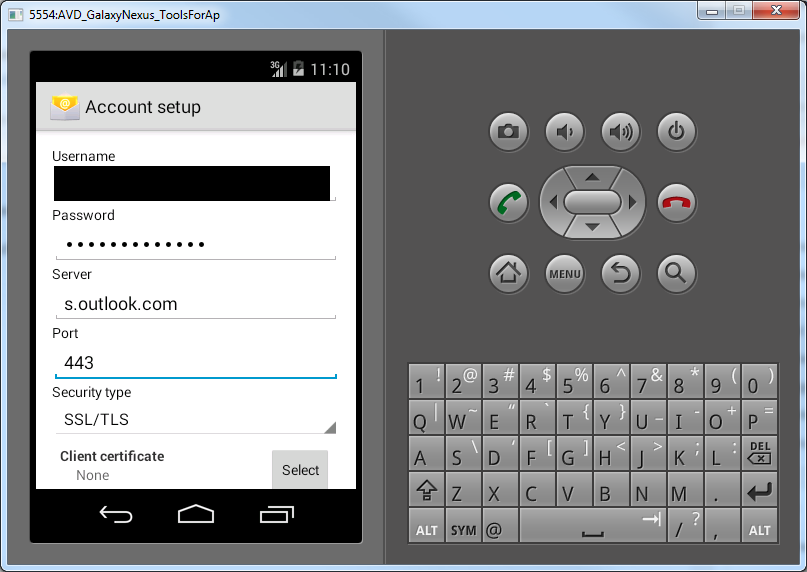
If successful you will see a screen like this:
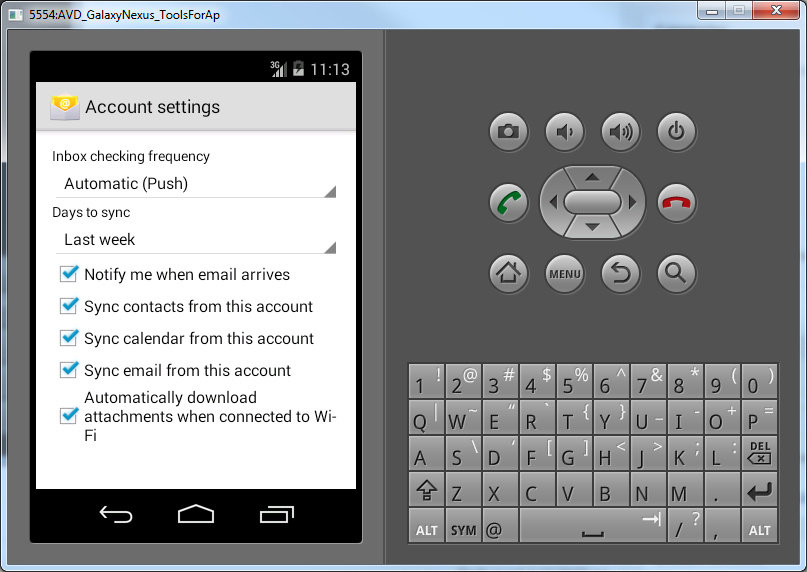
You are now done. Go test that calendar!
I recently installed Visual Studio Tools for Apache Cordova CTP 3.1 in Visual Studio 2013 with Update 4 and when trying to build I kept getting the error:
Command failed with exit code 8 Visual Studio - mdavscli
The problem was that I has upgraded my version of Android SDK which was not compatible.
To troubleshoot this I turned on the diagnostic build here is how:
Go to Tools –> Options –> Projects and Solutions –> Build and Run, change MSBuild project build output verbosity to Diagnostic. Rebuild the project and post the text from output window
The output window showed the following error:
BUILD FAILED
C:\Programs\SDK\tools\ant\build.xml:597: The following error occurred while executing this line:
C:\Programs\SDK\tools\ant\build.xml:649: The following error occurred while executing this line:
C:\Programs\SDK\tools\ant\build.xml:694: Execute failed: java.io.IOException: Cannot run program
“C:\code\samh\platforms\android\CordovaLib\${aapt}”
(in directory “C:\code\samh\platforms\android\CordovaLib”): CreateProcess error=2,
after a little research I found out it looks like ant commands are broken in Android SDK 24.3, which cordova build is using.
I downgraded to previous release (24.2.0) and ant works fine now.
I downgraded to the following version of the sdk http://dl-ssl.google.com/android/repository/tools_r24.2-windows.zip
To downgrade:
I am currently working on a project that takes advantage of some DevExpress components. Recently we ran into an issue where ASPxDateEdit caused the parent page to scroll if the control was used in an IFrame. Oddly enough this issue only happened on Chrome (and potentially other webkit browsers), but not on IE.
The only way we were able to sole this issue was to add the following css to the control
-webkit-backface-visibility: hidden;
in my case I was working with ASPXDateEdit so I added it to DevExpress’s
.dxeCalendar class.
At the time of writing this I am using DevExpress WebForms version 14.2.7 (released 22-APR-2015)
Today I was working with the DevExpress AspxHtmlEditor, when I noticed that the toolbar icons were sometimes blurry, but would clear up on mouse over.
Turns out my browser zoom was not set to 100%. Setting the Zoom to 100% resolved the issue.